Listing Tags
When creating or editing an existing form in Contact Form 7, you will see accordion sections for each type on your site, and within these you can drag your custom categories into Contact Form 7 for the outgoing email content.
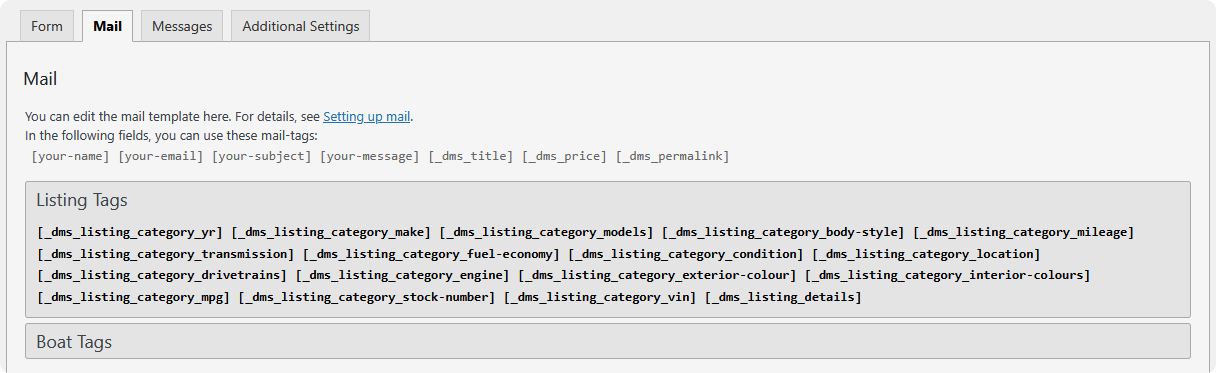
The accordions appear in the Mail tab, in the list of available mail tags above the mail template. Click a type's header to expand it, then copy the tag you want into the subject or body.
Global tags
There are also a few global tags which are not restricted to any type:
| Tag | Inserts |
|---|---|
[_dms_title] |
The listing's title |
[_dms_price] |
The listing's price |
[_dms_permalink] |
The full URL of the listing |
[_dms_listing_details] |
A ready-made block with the listing's URL and title, labelled with the type's name |
[_dms_listing_details] is the quickest way to get useful context into an email without assembling it field by field. It produces something like:
The word Vehicle comes from the listing type's singular name, so it reads correctly whether you sell cars, boats, or trailers.
Category tags
Every category on every listing type gets its own tag, following this pattern:
So a VIN category on a Cars type gives [_dms_cars_category_vin], and a Body Style category gives [_dms_cars_category_body-style].
Both halves are slugs, not display names — which is why a category called Body Style becomes body-style. Rather than composing these by hand, take them from the accordion for the type you're working with; that list is generated from your actual categories and always uses the right form.
Category tags are the reason this extension exists: they let a dealer receive the VIN, mileage, stock number, trim, or any other field you track, without the buyer having to type any of it.
Where tags are replaced
Substitution runs across the whole mail template, not just the body:
- Subject
- From
- To
- Additional headers
- Message body
Both Mail and Mail (2) are processed, so an autoresponder to the buyer can name the vehicle they enquired about.
Because the subject line is included, a pattern like this works well:
Dealers scanning an inbox then see the vehicle without opening anything.
Legacy tags
If you migrated from the older Automotive Listings plugin, its tag formats are still honoured:
| Legacy tag | Equivalent |
|---|---|
[_price] |
[_dms_price] |
[_listing_details] |
[_dms_listing_details] |
[_{type slug}_details] |
[_dms_listing_details] |
[_{category slug}] |
The matching category tag |
These continue to work, so existing forms keep sending after an upgrade. They aren't listed in the accordions — use the _dms_ forms for anything new.