Translating
Language columns
While viewing your terms or categories in the DMS pages, you will see new columns for each additional language indicating whether or not that term is translated. Click the X icon and it will take you directly to that term in WPML to translate it:
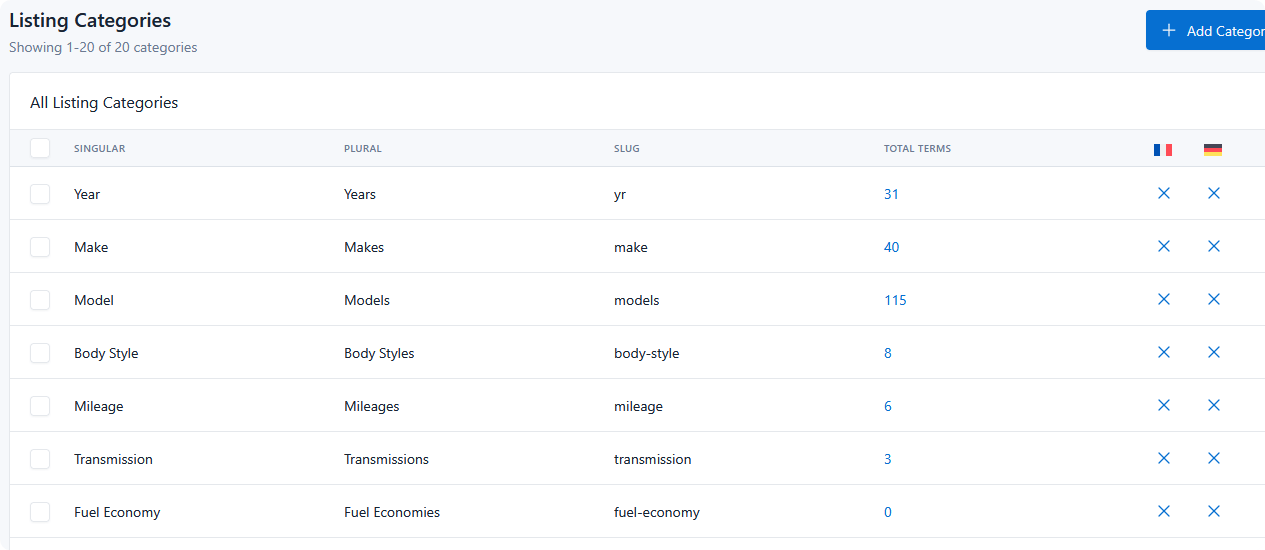
- One column per active language, headed by that language's flag.
- A check means a translation exists for that language.
- An X means it does not.
- Either icon links straight into WPML String Translation, pre-filtered to that string — and the translation editor opens automatically, so you land on the field ready to type.
These columns appear on the terms, categories, and badges tables.
A category counts as translated only when all of its translatable names are done, so a category showing an X may already be partly translated. Badges are judged on their text.
Switching language in the admin
DMS admin pages gain a Language dropdown in the page header, showing the current language's flag and name. Use it to view your DMS data as a given language, or select All languages.
Why fields are disabled
DMS values have one source of truth: the site's default language. Anything else is a translation, and translations live in WPML.
Two things enforce that:
- Automatic redirect. Opening DMS settings, the options page, listing types, or category pages while another language is active sends you back to the default language. A notice explains what happened and links to the right WPML String Translation domain.
- Disabled inputs. On a category page in a non-default language, the fields are disabled and an info alert points you to WPML → String Translation for that listing type.
This prevents the common failure where a value edited in Spanish silently overwrites the English original, since DMS stores one value per field regardless of the active language.
Where to find strings in WPML
In WPML → String Translation, filter by domain:
| Looking for | Domain |
|---|---|
| Anything belonging to a listing type — its categories, terms, and badges | dms-type-{type id} |
| Global DMS options | dms-global-options |
Within a domain, string names follow a predictable pattern, which makes the search box effective:
| String | Name pattern | Example |
|---|---|---|
| Term | term-{term id}-term |
term-482-term |
| Category | category-{category id}-{field} |
category-19-singular |
| Badge | badge-{badge id}-{field} |
badge-7-text |
| Type | type-{field} |
type-singular |
Searching for category-19 finds every field on that category at once.
Translating from the DMS table columns is usually faster than browsing WPML directly, since the link carries the filter and opens the editor for you.
After translating
Translated values are applied to DMS output automatically — no second step, no re-scan. Front-end pages viewed in a translated language show the translated type, category, term, and badge names.